WhatsApp
Platform capabilities

A structured workspace for accreditation readiness and evidence governance.

Accredia360 is accreditation management software for higher education institutions, bringing accreditation cycles, compliance work, evidence, ownership, reviews, approvals and readiness monitoring into one configurable workspace. For NAAC and NBA accreditation—and related NIRF and NABET work—teams can organize records and coordinate workflows against the applicable official framework.

NAACNBANIRFNABETAQAR & SSR
Configurable accreditation workCycles, roles and standards
Evidence governance workflowCollect, review and approve
Readiness informationProgress across the cycle
Accreditation workspaceCurrent workflow visibility
Evidence workflowContributor → Reviewer → Approver
Readiness visibilityProgress, evidence and cycle status
Capability areas

From evidence records to institution-level readiness information.

Designed around the operational needs documented for Accredia360: configurable cycles, structured evidence, clear accountability, automated notifications and real-time progress visibility.

01

Custom User Profiles

Configure profiles around institutional responsibilities, including Super Administrator, Accreditation Coordinator, Criteria In-Charge, Department Coordinator and Faculty / Contributor.

  • Institution-specific responsibility roles
  • Access aligned with assigned responsibilities
  • Visible responsibility across cycles
02

Accreditation Cycle Setup and Tracking

Create and manage multiple accreditation cycles with cycle type, dates, duration and deadlines, then track their status through visual views.

  • Multiple cycle records
  • Internal / external cycle types
  • Deadline and workflow status
03

Authority and Governance Mapping

Define institutional authorities and map them to cycles and criteria so governance structures are visible within the accreditation process.

  • Department and IQAC responsibility records
  • Cycle-to-authority associations
  • Criteria responsibility
04

Evidence Review and Decision Workflow

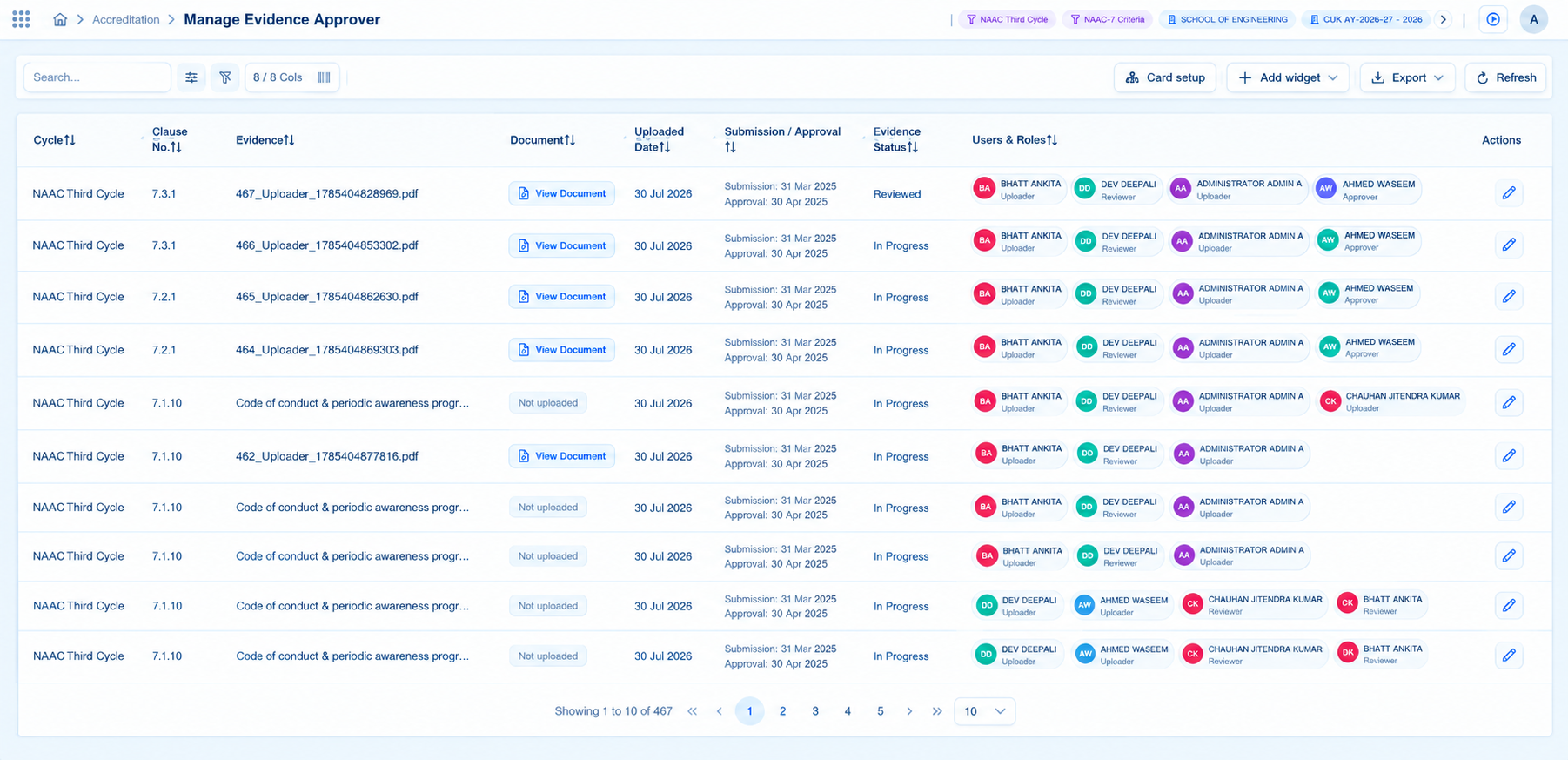
Every evidence item can move through a structured Contributor–Reviewer–Approver workflow with defined responsibilities at each stage.

  • Contributor submits evidence
  • Reviewer examines completeness and quality
  • Approver records the decision
05

Workflow Notifications

Reviewer and Approver actions can trigger email notifications for comments, rework requests, status changes, approvals, rejections and feedback.

  • Notifications tied to workflow actions
  • Stakeholder workflow updates
  • Fewer repeated status requests
06

Evidence Records and Documentation

Centralize evidence against criteria, clauses and metrics while tracking deadlines and the status of each evidence item.

  • Central evidence repository
  • My Evidence workspace
  • Initiated → Approved / Rejected workflow states
07

Readiness Dashboards and Progress

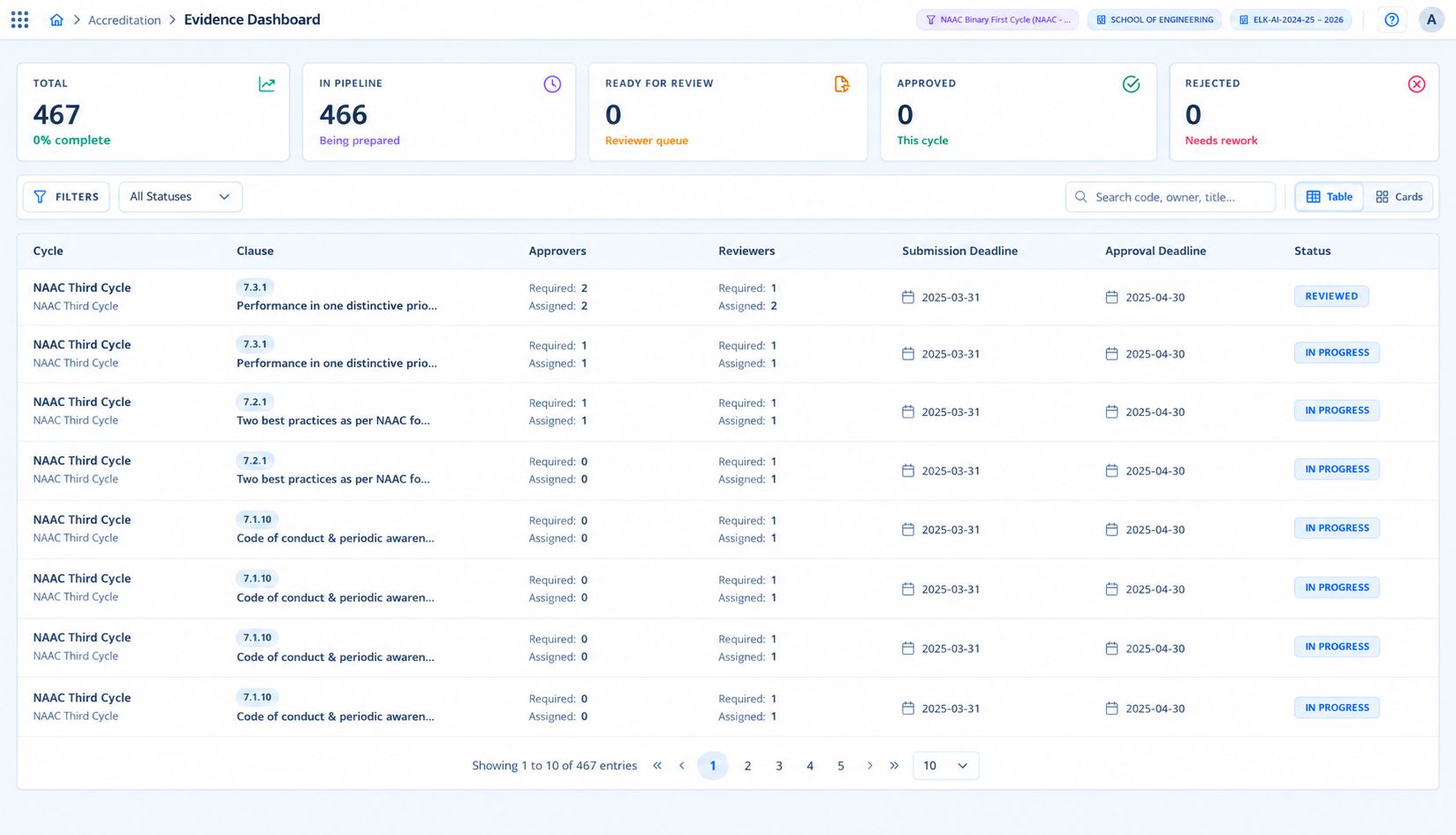
Monitor total evidence, completion percentage, pipeline states, review status, clause-level assignments and cycle progress through dashboards.

  • Evidence counts and completion information
  • Workflow pipeline and review views
  • Cycle analytics and progress views
08

Manage User Achievement

Give faculty and staff a structured place to submit professional activities, awards and achievements with supporting documentation.

  • Achievement level classification
  • Achievement type classification
  • Evidence-backed faculty data
Evidence intelligence

See the evidence record across its workflow.

Accredia360 structures evidence work from initiation through review and decision, giving teams a shared operating view rather than isolated files and follow-ups.

InitiatedIn ProgressReady for ReviewApproved / Rejected
Accredia360 evidence dashboard
Evidence and progress visibility across the accreditation workspace.
Workflow control

Review, rework and record decisions with defined responsibility.

Reviewers can check evidence for completeness and quality, while Approvers can provide the final approval or rejection. Notifications keep contributors and coordinators informed.

Reviewer controlComments, rework requests and status updates
Approver decisionsApproval, rejection and feedback notifications
Shared visibilityStakeholders stay aligned on evidence progress
Accredia360 evidence approval workflow
Manage evidence with structured review and approval responsibilities.
Built for evolving frameworks

Configure requirements for the accreditation cycle.

Accredia360 supports ready-made configuration packs for major Indian frameworks while allowing standards, requirements, evidence items, templates and compliance logic to be defined for new cycles.

Explore the documented frameworks. See how Accredia360 works.
NAACInstitutional & Program Accreditation
NBAProgram-level Accreditation + SAR
NIRFRanking Data & Parameters
NABETQuality & Skill Frameworks
RAFBAFMBGLAQARSSR
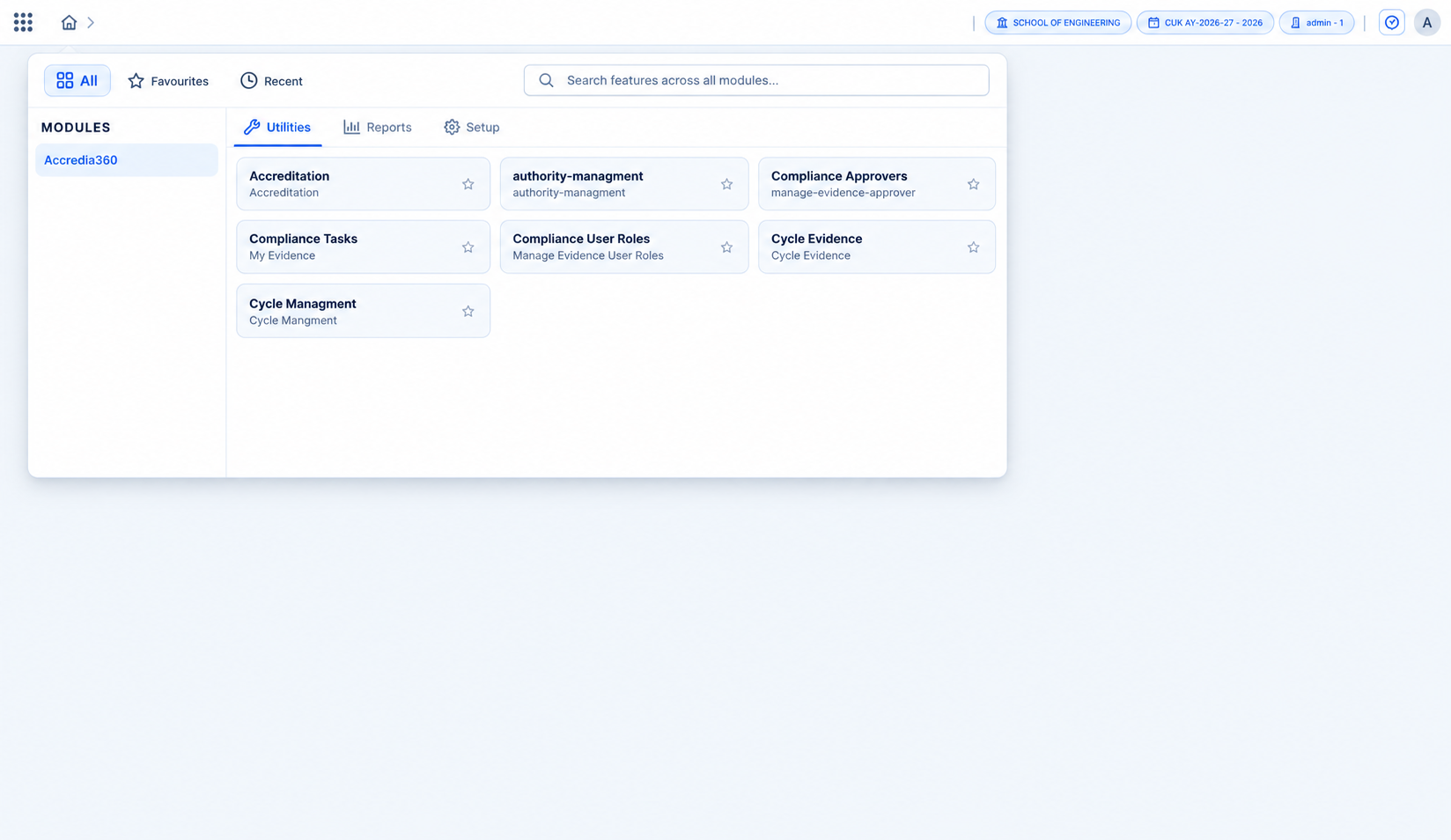
Accredia360 modules and utilities
Configurable modules and utilities for accreditation operations.
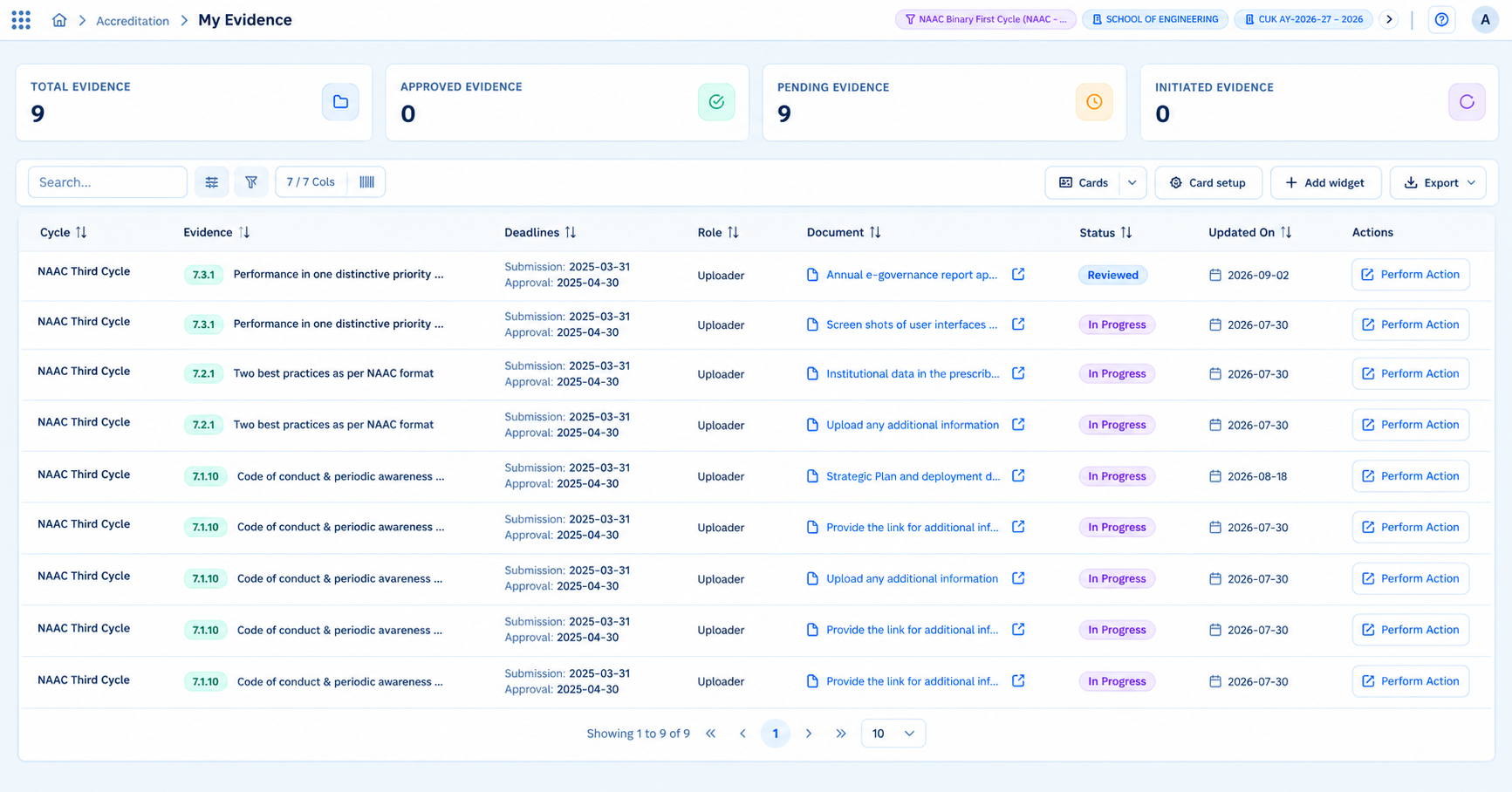
Accredia360 My Evidence workspace
Personal evidence views help contributors focus on their assigned work.
For every contributor

Connect individual evidence work with institutional records.

Faculty and contributors can work with their assigned evidence while Manage User Achievement provides a structured channel for professional activities, awards, research grants, fellowships, patents, certifications and other documented achievements.

Contributor workspaceAchievementsSupporting documentsStructured classification
Complementary intelligence

Use OBE Track alongside accreditation workflows.

EduNova’s OBE Track works alongside Accredia360 for outcome-based education analytics and accreditation-ready outcome intelligence.

CO-PO-PSO evaluation, mapping and attainment Assessment evidence linkage and traceability Gap analysis and continuous improvement Accreditation-ready outcome reports
Accredia360Evidence & workflow
OBE TrackOutcome intelligence
Connected quality intelligence
Operational benefits

Turn accreditation activity into a more coordinated process.

Accredia360 brings requirements, evidence, ownership and workflow status into a shared workspace. The benefits below describe how the documented capabilities can support day-to-day accreditation and compliance work; outcomes depend on each institution’s configuration and use.

Clearer ownership of requirements

Connect criteria and evidence work to named institutional roles so teams can see who is responsible for contributing, coordinating, reviewing and approving.

  • Role-aligned responsibilities
  • Criteria and department ownership
  • Shared visibility across the cycle

More organized evidence records

Keep supporting documentation associated with relevant criteria, clauses or metrics instead of relying only on disconnected files and informal follow-ups.

  • Centralized evidence workspace
  • Status and deadline tracking
  • Evidence mapped to requirements

A visible review and approval path

Make the hand-off from contributor to reviewer to approver easier to follow, with feedback and rework represented within the workflow.

  • Defined review stages
  • Recorded decisions and feedback
  • Clearer next steps for contributors

Fewer manual status follow-ups

Workflow-linked email notifications can help relevant stakeholders stay informed when evidence is commented on, returned for rework, approved or rejected.

  • Updates tied to workflow actions
  • Feedback visibility for stakeholders
  • Less reliance on repeated status queries

Earlier visibility into readiness gaps

Use configured dashboards and progress views to review evidence completion, pending workflow stages and cycle status while preparation is underway.

  • Completion and evidence counts
  • Pending review and approval states
  • Cycle-level progress information

A more consistent operating model

Organize multiple cycles and configure requirements for the applicable framework while keeping the core evidence and responsibility workflow familiar to teams.

  • Cycle-specific dates and deadlines
  • Framework and requirement configuration
  • Reusable roles and workflow concepts

Want to see how these capabilities fit together?

Explore the workflow Explore frameworks

Accredia360 questions

Accredia360 questions and answers

Accredia360 is a configurable accreditation and compliance management platform for higher education institutions. It helps teams organize requirements, evidence, ownership, review and approval workflows, and readiness information.

The documented product information identifies configuration packs for NAAC, NBA, NIRF and NABET. Accredia360 is also described as configurable for standards, requirements, evidence items, templates and compliance rules for a cycle.

AQAR and SSR work can be organized as defined cycles with deadlines and mapped evidence, according to the institution’s configured process.

Contributors add or submit evidence, Reviewers check it and can request changes, and Approvers record the final decision. Available actions depend on the configured workflow.

Readiness views can show evidence counts, completion information, review and approval states, responsibility assignments, cycle analytics and progress indicators, depending on the configured workflow and data.

Yes. Accredia360 can organize multiple accreditation cycles with their own cycle types, dates, deadlines and status information.

The documented Manage User Achievement module supports structured faculty and staff records for professional activities, awards and other configured achievement types, with supporting documentation.

The product documentation identifies NAAC Revised Framework (RAF), Binary Accreditation Framework (BAF) and Maturity-Based Graded Levels (MBGL) as configuration models. Institutions should confirm the applicable model and current requirements with NAAC.

Accredia360 focuses on accreditation requirements, evidence, ownership and readiness workflows. OBE Track is a complementary DigitalEdu solution for outcome-based education activities such as CO-PO-PSO mapping and attainment; confirm the scope of any integration with DigitalEdu.

Accredia360 is intended for institutional leaders, accreditation coordinators, IQAC and quality assurance teams, criteria owners, department coordinators, administrators and faculty contributors.

The platform is described as configurable for standards, requirements, evidence items, templates and compliance rules for a cycle. Confirm the configuration needed for a particular framework with DigitalEdu.

Institutional consultation

Want to discuss an accreditation workflow?

Explore how Accredia360 can support your institution's accreditation cycles, evidence management, ownership workflows, readiness monitoring and quality processes.

Universities • Autonomous Institutions • Colleges • IQAC Teams • Accreditation Leaders

Designed For Principals & Directors Accreditation Coordinators IQAC Teams Criteria In-Charges Department Coordinators Faculty Contributors

Suitable for higher education institutions, IQAC teams, accreditation coordinators, criteria owners and faculty contributors.

Institutional consultation Focus
Multi-Framework Configuration Explore NAAC, NBA, NIRF, NABET and configurable accreditation standards.
Evidence Management Centralize evidence and map it to criteria, clauses, metrics and deadlines.
Role-Based Workflow Define Contributor, Reviewer and Approver responsibilities.
Readiness Track Readinessing Track Readiness evidence completion, workflow states and accreditation cycle progress.
Faculty Achievements Capture structured awards, patents, fellowships and professional contributions.
OBE Track Complement Add CO-PO-PSO attainment and outcome analytics when paired with OBE Track.
Consultation Preparation Bring the framework or accreditation cycle you are planning for, along with any key dates or deadlines you already know.
Practical Next Steps Discuss the teams, evidence workflows and readiness questions your institution wants to organize first.
Documentation & Ownership Identify key records, supporting documents and the people responsible for keeping evidence current.
Review & Approval Explore how submissions can move through review, feedback and approval before they are used for reporting.